Finding a YouTube video downloader is easy, but finding one that's fast, reliable, high-quality, and secure is not. Among the many options, NoteBurner YouTube Video Downloader has earned a strong reputation over the past two decades. When you search for "free YouTube video downloader," you'll often see NoteBurner at the top of recommended lists. But does it truly live up to its reputation?
In this review, we'll take a closer look at what NoteBurner YouTube Video Downloader offers. From its key features and pricing to real-world download tests and comparisons with other popular YouTube downloaders, we'll help you decide if it's worth using.

Yes — if you're looking for a free, reliable, and feature-rich YouTube downloader, NoteBurner is definitely worth considering. Unlike many free YouTube downloaders that are riddled with ads, have download limits, or stop working after YouTube updates, NoteBurner offers a smoother user experience. You can download YouTube videos and music for free for offline viewing and listening. It also supports playlists and channels, and lets you save high-quality videos and audio. Furthermore, it's regularly updated and provides timely customer support.
To verify whether these claims hold up in real-world use, we thoroughly tested NoteBurner by downloading single YouTube videos, playlists, MP4 videos, and MP3 audio files. We also tested its download speed, output quality, subtitle support, stability, and user experience. Our test results showed that NoteBurner performs exceptionally well in all aspects, matching the official claims.
| Category | Our Verdict |
|---|---|
| Free to Download YouTube | ⭐⭐⭐⭐⭐ Completely free with no ads or download limits. |
| Download Performance | ⭐⭐⭐⭐⭐ Fast, smooth, and consistent in all our tests. |
| Output Quality | ⭐⭐⭐⭐⭐ Excellent video, audio, and subtitle preservation. |
| Ease of Use | ⭐⭐⭐⭐⭐ Beginner-friendly with a built-in browser. |
| Stability | ⭐⭐⭐⭐☆ Reliable overall, with only occasional issues reported after YouTube updates. |
| Overall Rating | ⭐⭐⭐⭐⭐ 4.9 / 5 |
Originally, NoteBurner YouTube Video Downloader was designed as a dedicated tool for downloading videos and music from YouTube. As the demand for offline viewing grew, users also wanted a single downloader that could save content from other streaming and social media platforms without switching between different tools.
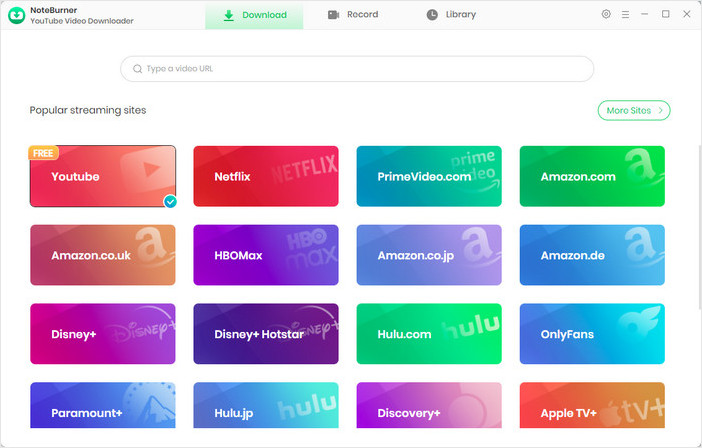
To better meet these needs, the software has gradually evolved into an all-in-one video downloader that now supports 1,000+ websites, including YouTube, Netlfix, Amazon Video, Disney Plus, Hulu, Paramount Plus, and many more. Despite this expansion, one thing hasn't changed — downloading videos and music from YouTube remains completely free. More importantly, the software has continued to refine its YouTube downloading capabilities with each update. Whether you want to save a single video, an entire playlist, or extract audio from YouTube videos, NoteBurner can easily handle them all
Here are some of the standout features that make NoteBurner YouTube Video Downloader a popular choice for saving YouTube videos and music:
Instead of relying solely on the official feature list, we tested NoteBurner YouTube video downloader in a real-world environment to verify its performance. Our evaluation focused on most everyday user tasks, such as downloading single YouTube videos, extracting audio, saving playlists, and verifying the quality of the downloaded files. Below is our complete testing process and results.
To ensure the results were as objective and repeatable as possible, all tests were performed under the following conditions.
| Testing Item | Details |
|---|---|
| Software | NoteBurner YouTube Video Downloader |
| Operating System | Windows 11 Pro 24H2 (64-bit) |
| Internet Connection | 500 Mbps Fiber Broadband |
| Output Formats Tested | MP4, MP3 |
| Video Quality Tested | 1080P, 4K, 8K (where available) |
| Download Scenarios | Single Video (MP4), Single Video (MP3), Playlist (MP4), Playlist (MP3) |
| Number of Test Runs | Multiple individual videos and playlists were randomly selected for testing. |
Our download tests were divided into the following four common scenarios. The following steps show the basic process of downloading YouTube videos and audio using NoteBurner. Specifically, we tested the following four scenarios:
Step 1 Launch NoteBurner YouTube Video Downloader
After installing and opening the program, we saw a simple and intuitive interface, along with shortcuts to the major supported streaming services. When we click on "YouTube", the program will open the YouTube website in its built-in browser.
Program Main Interface
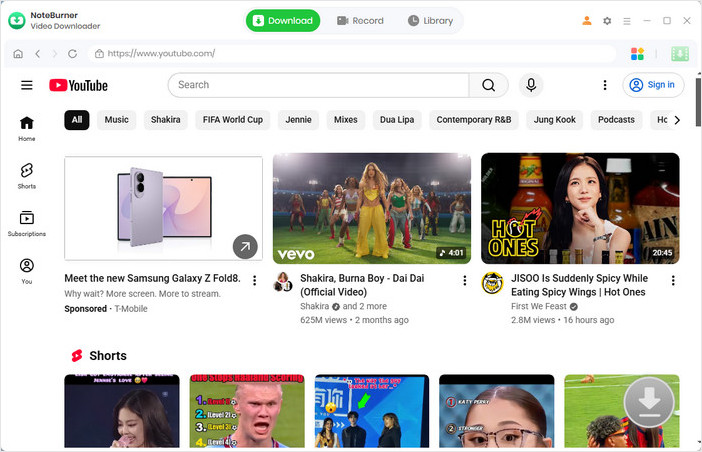
YouTube Platform Interface
Step 2 Configure Download Settings
Before starting the tests, we customized the download preferences, including: output format (MP4 / MKV / Auto), video quality (480p - 8K), audio, subtitle (language, Internal / External / Hardcode) and output folder.
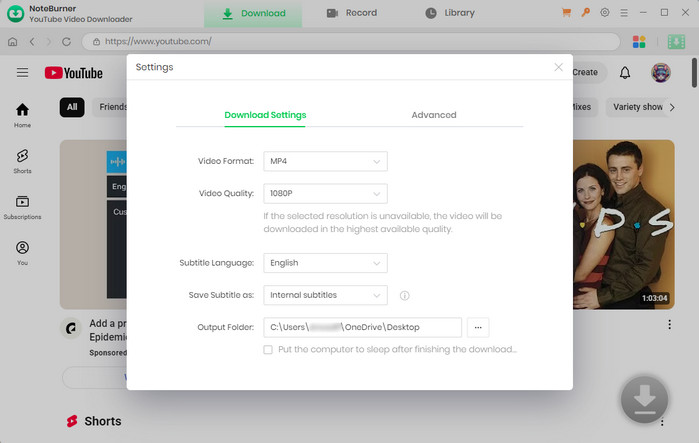
Settings Window
Step 3 Select Test Videos and Playlists
We searched for multiple YouTube videos and playlists of different durations and resolutions. Logging into a YouTube account was optional throughout our testing.

Testing Single Video Download
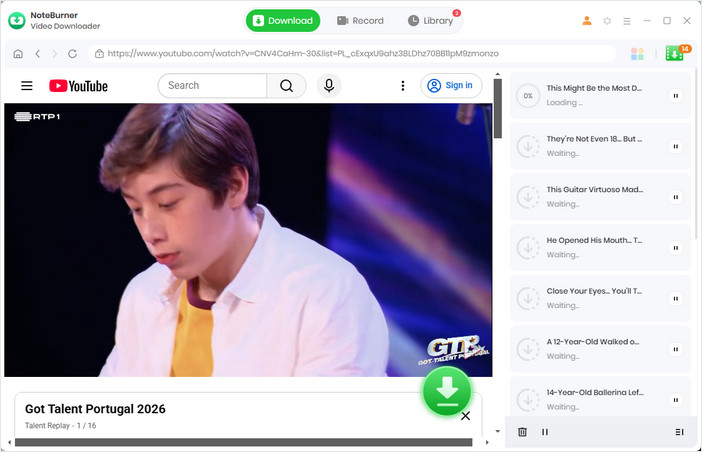
Testing Playlist Download
Step 4 Choose Advanced Download Options
Before downloading, we selected different output qualities, audio, and subtitle options whenever available. For audio testing, we switched to Download as Audio to export MP3 files.
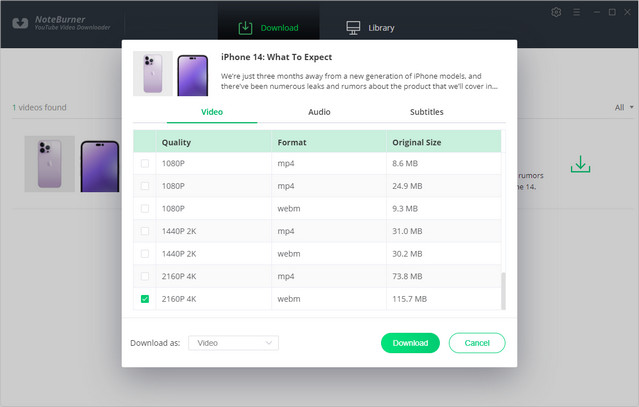
Download a YouTube Video to MP4
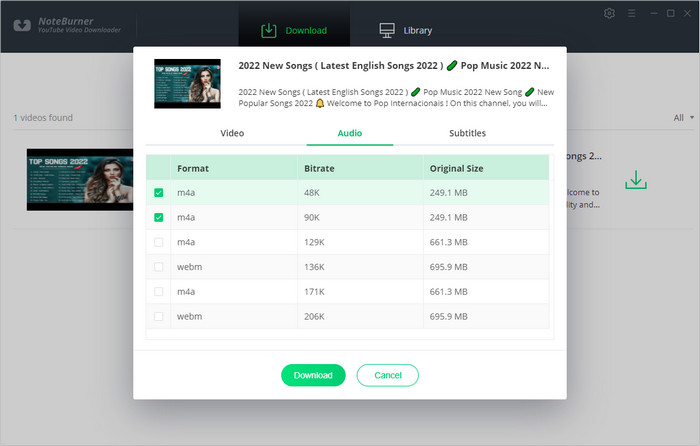
Download a YouTube Video to MP3
Step 5 Download Videos and Audio
We repeated the downloading process multiple times across different scenarios, including single videos, playlists, MP4 downloads, and MP3 extraction, while monitoring download speed and stability.
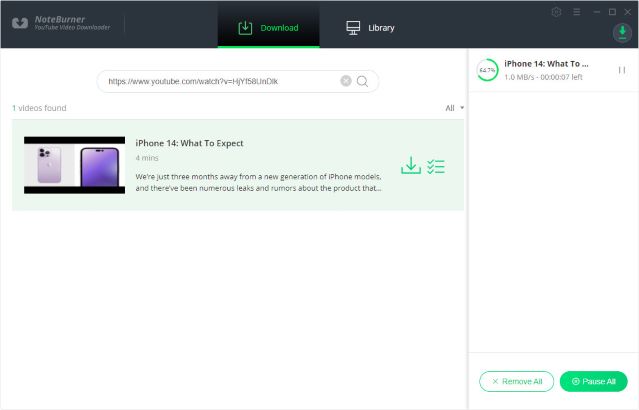
Downloading a YouTube Video as MP4
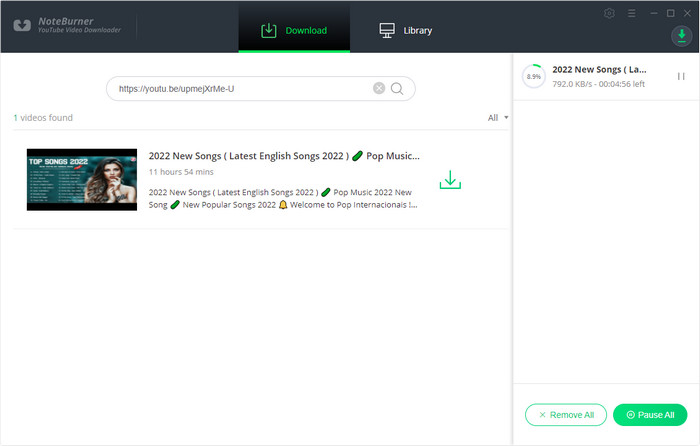
Downloading a YouTube Video as MP3
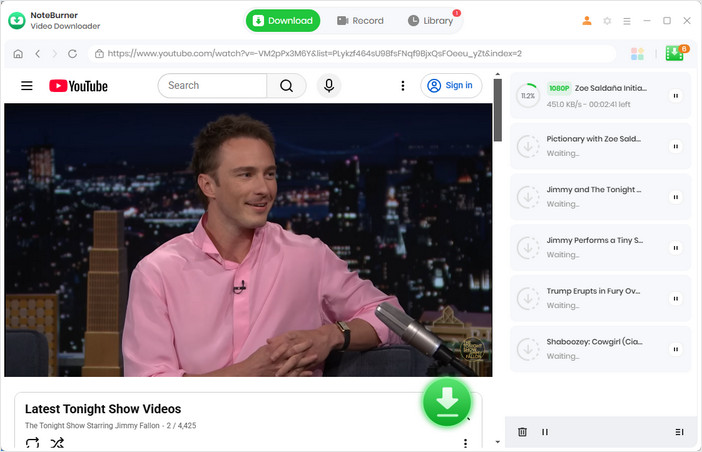
Downloading a YouTube Playlist to MP4
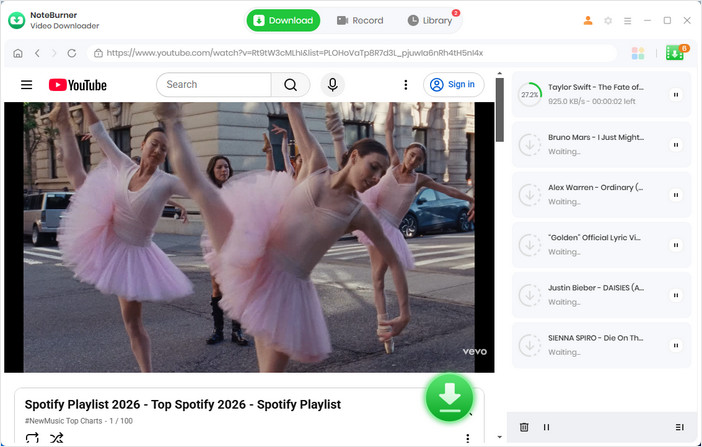
Downloading a YouTube Playlist to MP3
Step 6 Verify Downloaded Files
Finally, we opened every downloaded file from the Library to verify the output quality, audio, subtitles, and playback compatibility.
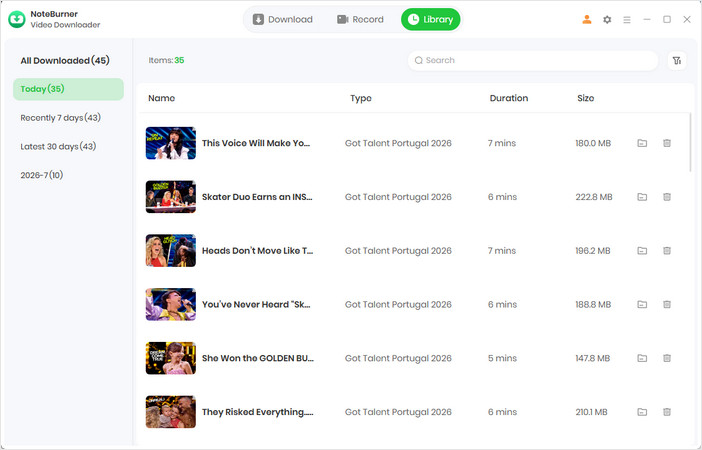
Download Library
More Tutorials:
After completing all download scenarios, we evaluated the software based on download speed, output quality, stability, ease of use, and whether it delivered the features advertised by NoteBurner.
| Official Feature | Our Result | Comments |
|---|---|---|
| Free YouTube video downloads | ✅ Passed | Completely free with no download limits. |
| Download up to 8K videos | ✅ Passed | Available where the original video supports 8K. |
| Download playlists | ✅ Passed | Batch downloads completed successfully. |
| Extract MP3 audio | ✅ Passed | Audio files retained excellent quality. |
| Subtitle support | ✅ Passed | Worked correctly on supported videos. |
| Fast download performance | ✅ Passed | Stable download speed throughout testing. |
Overall, our testing confirmed that NoteBurner delivered on nearly all of its advertised YouTube downloading features. Actual results may vary depending on your internet connection and the original YouTube video quality.
Based on our real-world tests, NoteBurner YouTube Video Downloader handled all of our download tasks smoothly and reliably. It not only processed both individual videos and playlists efficiently but also maintained excellent output quality throughout the process. With its intuitive interface and straightforward workflow, users can easily start downloading right away. Overall, it proved to be a reliable downloader for everyday YouTube use.
What Do Other Users Say?
In addition to our own testing, we also looked at feedback from real users across review platforms and online communities. Most users praised its ease of use, download quality, and reliable performance.
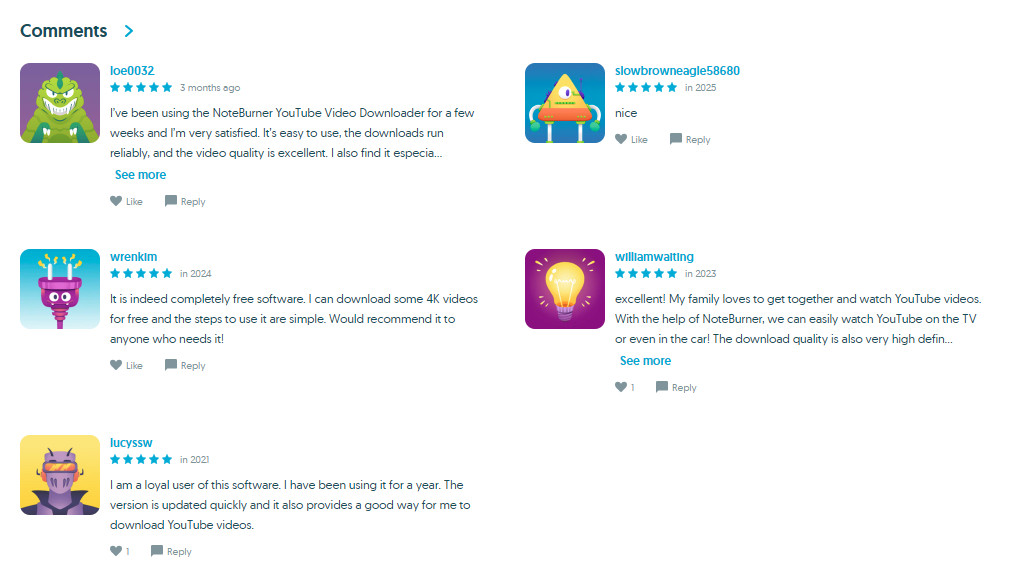
That said, we did find a few user reports of occasional download failures or error codes. In most cases, these issues appeared to be related to changes on YouTube's side rather than the downloader itself, and were typically resolved after contacting NoteBurner's customer support. For this reason, we rated its stability 4 out of 5 stars for stability instead of a full score.
| Category | Rating |
|---|---|
| Ease of Use | ⭐⭐⭐⭐⭐ |
| Download Speed | ⭐⭐⭐⭐⭐ |
| Output Quality | ⭐⭐⭐⭐⭐ |
| Playlist Support | ⭐⭐⭐⭐⭐ |
| Value for Money | ⭐⭐⭐⭐⭐ |
| Stability | ⭐⭐⭐⭐☆ |
| Overall Rating | ⭐⭐⭐⭐⭐ |
There are countless YouTube downloaders available today, ranging from simple online tools to full-fledged desktop applications. While many tools can download YouTube videos, they often differ in output quality, playlist support, ads, download limits, and long-term stability.
Based on our actual testing and hands-on evaluation, here's how NoteBurner compares with most free YouTube downloaders.
| Feature | NoteBurner | Most Free YouTube Downloaders |
|---|---|---|
| Free YouTube Downloads | ✅ Unlimited | ✅ Usually supported |
| Ads | ✅ Ad-free | ⚠ Often contains ads |
| Download Limits | ✅ No limits | ⚠ May have limits |
| Playlist Download | ✅ Supported | ⚠ Varies by tool |
| Video & Audio Formats | ✅ MP4, MKV, WebM, MP3 & more | ⚠ Usually limited |
| Output Quality | ✅ Up to 8K | ⚠ Depends on the source |
| Subtitle Support | ✅ Multiple subtitle options | ⚠ Basic or unavailable |
| Batch Download | ✅ Supported | ⚠ Often unavailable |
| Supported Websites | ✅ 1,000+ | ⚠ Usually YouTube only |
| Customer Support | ✅ 24/7 Support & Free Updates | ❌ Usually unavailable |
Compared with many free YouTube downloaders, NoteBurner is a better fit for users who value reliability and a hassle-free downloading experience over simply getting the job done.
If you're simply looking for a one-time download, almost any free tool may be sufficient.

Looking for a reliable YouTube downloader to download HD videos? This detailed article summarizes and analyzes the ten best YouTube video downloaders for you!
A: Yes. Based on our testing, NoteBurner is safe to download and use. The installer is free from intrusive ads or bundled software.
A: Yes, if you're downloading YouTube videos for your own personal offline viewing. However, you should not share, upload, sell, or use copyrighted content for commercial purposes without permission. Since copyright laws vary by country, always follow your local regulations.
A: Yes. NoteBurner supports downloading multiple YouTube videos in batches, including entire playlists and channels. During our real-world testing, playlist downloads were completed smoothly while preserving the selected video quality, audio tracks, and subtitles (where available).
A: NoteBurner can save YouTube videos in MP4, MKV, and WebM formats, and extract audio as MP3 and M4A. Depending on the original YouTube source, videos can be downloaded in resolutions up to 8K while maintaining the original quality whenever available.
A: Currently, NoteBurner does not provide a manual option to adjust the download speed. Instead, the software automatically optimizes the download process based on your network conditions and system performance, supporting download speeds of up to 5× whenever possible.
After thoroughly testing NoteBurner YouTube Video Downloader, we found that it largely delivers on what it promises. Throughout our evaluation, it handled single videos, playlists, MP4 downloads, and MP3 extraction smoothly while maintaining excellent output quality and a user-friendly experience.
What impressed us most wasn't just the fact that YouTube downloads are completely free. It was the combination of reliability, playlist support, multiple output formats, and responsive customer support.
If you're looking for a YouTube downloader that is free, stable, easy to use, and built for long-term use, NoteBurner is one of the best free YouTube downloaders we've tested. Whether you simply want to save a few videos for offline viewing or need a dependable downloader for daily use, it's well worth trying.